Look your client up on Companies House while you quote
Every limited company quote starts with the same small detour.
You open Companies House in another tab. You search for the client, scroll past the three companies with nearly the same name, find the right one, and copy the registered name across. Then you go back for the year end. Then you go back again, a week later, to type the company number, the registered address and the incorporation date into your compliance record.
None of it is difficult. All of it is retyping something that already exists, and retyping is where mistakes come from. A year end typed with the wrong year is not a typo you notice. It quietly changes how many months of catch-up the quote charges for.
So we have put Companies House inside the quote.
Type the name, pick the company
On a limited company quote, start typing the client's name in the Business / Client name box. After a few letters a list appears, headed From Companies House, with each company's number and registered address so you can tell the right one from its namesakes. A company that is dissolved or in liquidation is labelled, which is worth knowing before you quote it.
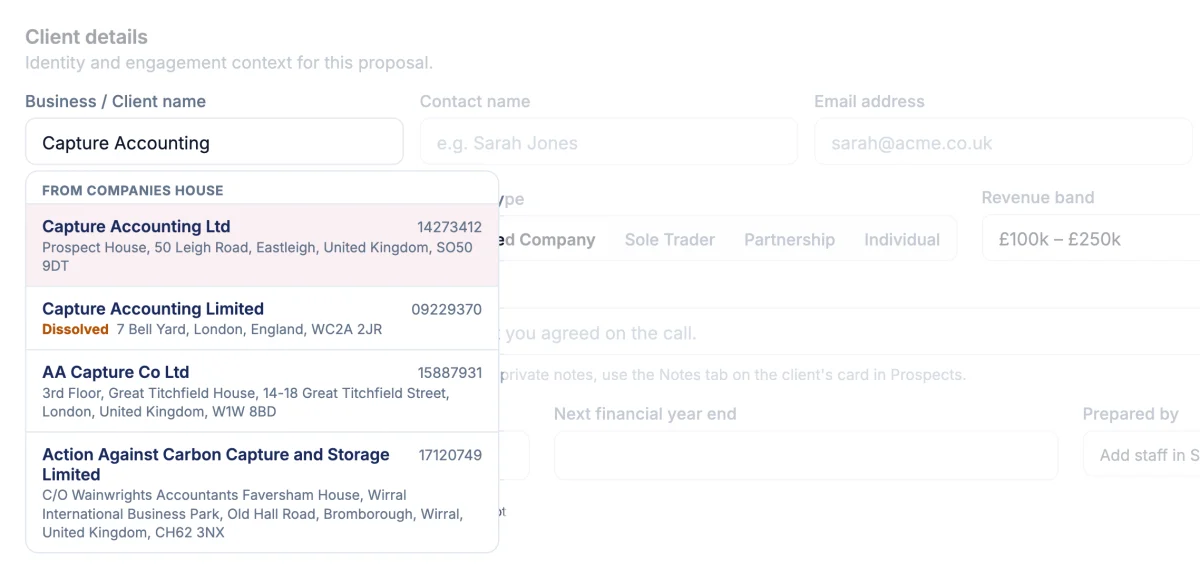
Click the right one and the quote fills in:
- The registered name, in ordinary capitals rather than the register's shouting ones, so "CAPTURE ACCOUNTING LTD" arrives as "Capture Accounting Ltd". If it replaced a name you had already typed, there is an Undo for a few seconds.
- The next financial year end, worked out from the company's accounting reference date, so the catch-up months are right first time.
- The client type, so an LLP becomes a partnership quote.
You can still just type. The search is an offer, never a gate, and if Companies House is unreachable the box works exactly as it always did.
It never overrules you
This was the rule we cared about most. The register is a starting point, not the final word, and you often know something it does not yet.
So if you have already entered a year end and Companies House has a different one, yours stays. The register's date is offered beside it, with a button to use it if you agree. Companies House can take a while to show a company that has just changed its accounting date, and the person who knows that is you, not the software.
The same goes for the client type. If you have already ticked services, switching the type would remove the ones that do not apply, so it is offered rather than done.
The director, one click away
For most limited companies, the person you are quoting is a director. Once the company is picked, click into Contact name and its current directors are listed. One click fills the first name and surname, without the middle names that the register carries.
If the person you are dealing with is the bookkeeper or the finance director, just type their name instead. Email and phone are not on the public register, so you still type those.
Overdue accounts are work you can quote
This is the one that pays for itself.
If Companies House shows the company's accounts as overdue, an amber note says so, names the period and the date they were due, and offers to add Prior Year Accounts to the quote with one click.
A new client with an overdue year is a new client with a piece of catch-up work attached. It is easy to miss in the meeting, and if you do, you end up doing it anyway, either for nothing or after an awkward second conversation about money. Now the register tells you before you name a price.
The compliance record fills itself
When you send the proposal, the client's onboarding and compliance record picks up what Companies House already knows: the registered name, the company number, the registered office, the SIC codes, the date of incorporation and the year end.
Only empty boxes are filled. Anything you have typed yourself is never replaced. A record you have already signed off is left alone. And if you started from one company's card to quote a sister company, that card keeps its own details rather than picking up the sister's. Getting the wrong company onto a compliance record is worse than leaving a box empty, so where there is any doubt, it leaves the box for you.
Nature of business is left for you too. The register only holds a SIC code, and a code is not a description of what your client actually does.
Nothing to connect
There is no account to link and no key to paste. Companies House publishes this information openly, and the lookup is simply there on every UK limited company quote.
Power Pricing does not keep directors' personal details. The register holds dates of birth and correspondence addresses; we show you names to pick from, and only the one you choose is kept, as the contact on your quote.
What it does not do
Being straight about the edges:
- It does not know turnover. Companies House does not publish it for most small companies, so the revenue band is still your call.
- It is for limited companies and LLPs. Sole traders, partnerships and individuals are not on the register, so their quotes work exactly as before.
- It does not yet add directors as clients of their own. Quoting a director's personal tax return alongside their company, straight from the register, is the next piece of work.
- The company number is not yet printed in the engagement letter. It goes to the compliance record for now. That is coming too.
Try it on your next quote
Open a new quote, choose limited company, and start typing a name you know. It takes a few seconds to see what it does.
Then tell us how it went. Anything that felt clunky, anything you expected and did not get, we want to hear it. The firms using a feature first are the ones who shape what it becomes.